
Tasks, when you have time for them.

Make room for the things you keep meaning to do.

Whether you want to read a chapter or get something done around the house, A Good Time suggests tasks from your list that fit your available time and where you are.

Free on the App Store · iPhone with iOS 18 or later

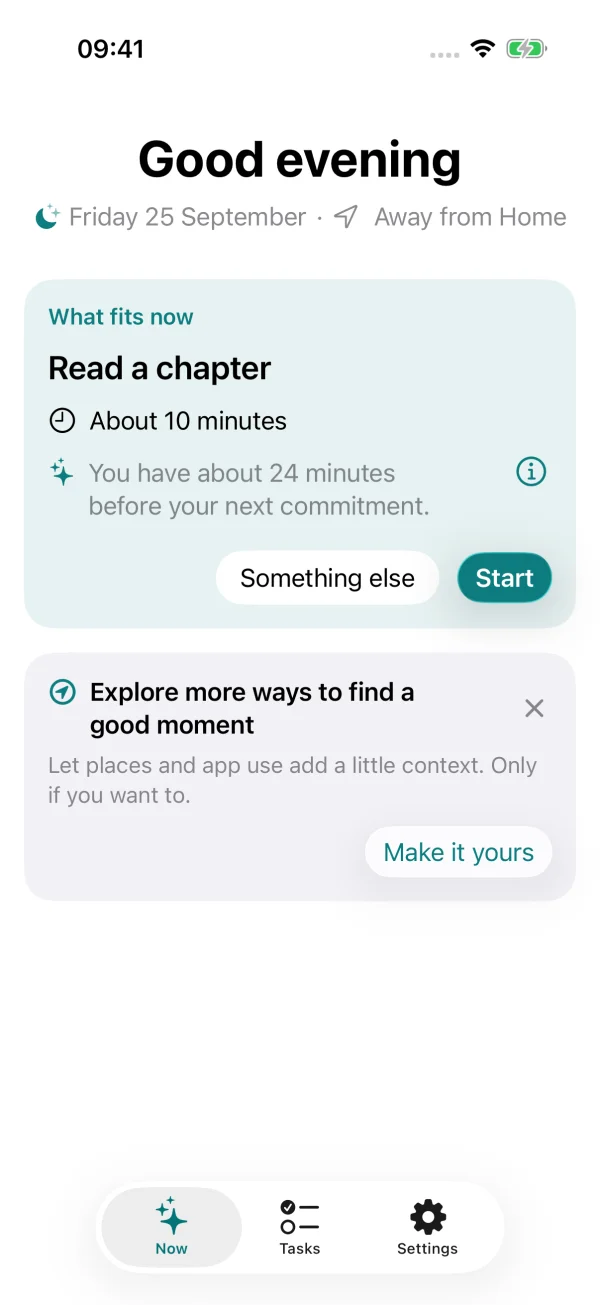
A Good Time’s Now screen suggesting Read a chapter, with its estimated time, a reason, and a Start button.
01 / A suggestion with an explanation of why it fits.
You decide when to act on a suggestion.There are no streaks to maintain.Your personal context stays on your device.

How it works.

A task list that considers when you can use it.

Alongside what you want to do, the app considers how long a task takes, where you can do it, and whether your calendar leaves enough time.

Review the details before saving.
02 /

Describe what you want to do.

Write a task in your own words, or use keyboard dictation. On a supported device, the app can fill in details such as duration and place, which you can review and change before saving.

You can also use the form directly or bring in a task from Apple Reminders.
From the notification to a finished task.
03 /

Start a task and record what you get done.

Once you start, the task stays on Now with a gentle timer. You can mark it done, record progress on an ongoing activity, or stop and return to it later.

If you have a free moment, you can ask for a suggestion without waiting for an automatic nudge.

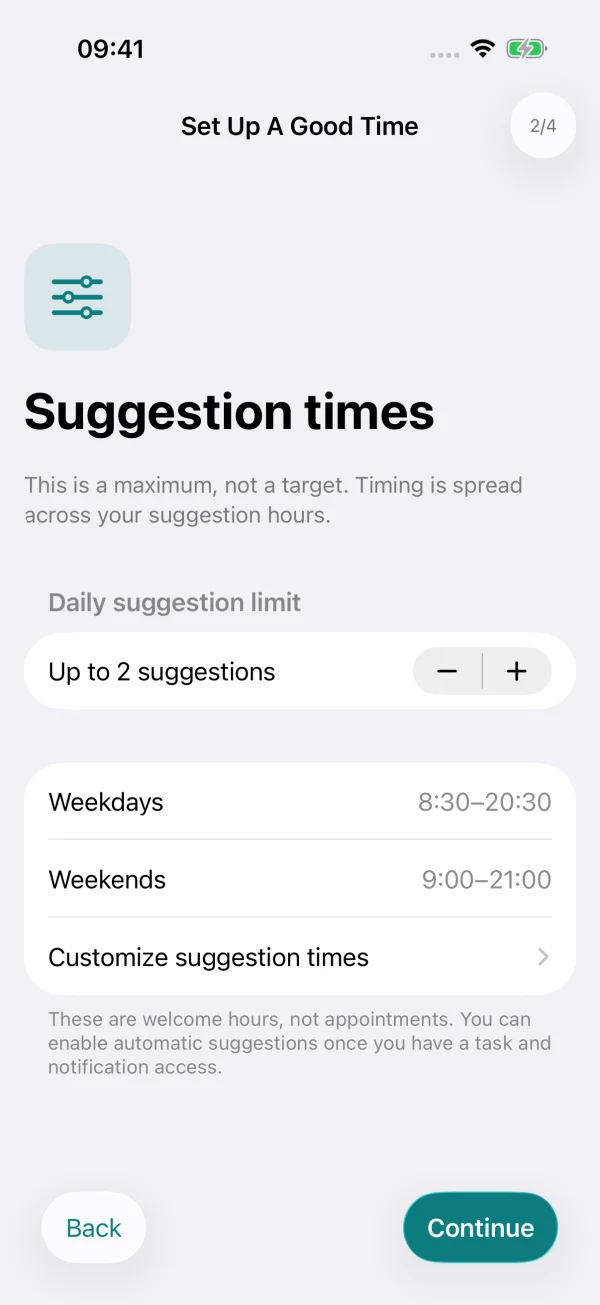
The suggestion preferences screen showing a daily maximum of two suggestions and weekday and weekend welcome hours.
Set the hours and daily maximum that suit you.
04 /

Choose when suggestions are welcome.

Set your welcome hours and a maximum of zero to five automatic suggestions a day. When a suggestion arrives, you can snooze it, choose something else, or leave it for another day.

The daily maximum is a limit, so the app may send fewer suggestions when there isn’t a suitable opportunity.

Optional connections.

Use the context that helps you.

You can connect your calendar, reminders, and other signals to make suggestions more relevant, without adding appointments to your calendar.

Calendar availability.

Use selected calendars to find free time around your commitments. The app retains busy and free intervals rather than event titles, descriptions, attendees, or locations.

Apple Reminders.

Activate existing Apple Reminders so their titles, due dates, and completion stay in sync with the tasks you use in A Good Time.

Places.

Choose where a task can be done and, if you enable arrival suggestions, the app can check for a suitable task when you get there.

Screen Time.

Choose apps or app categories that you associate with procrastination. When you spend time in them, A Good Time may suggest something more constructive from your task list.

Apple Watch.

The Apple Watch companion lets you request a suggestion, start a task, and record progress or completion, while your iPhone manages the task list and timing. It’s part of the one-time unlock; nudges on your watch stay free.

Progress and reflection.

You can review your focused sessions and weekly progress without streaks or a score to maintain.

Privacy.

Your tasks and timing are processed on your device.

A Good Time uses your task and timing context locally, without an account, analytics, or an app backend.

  • Calendar access is used for busy and free intervals, not a saved copy of your events.
  • Places and Screen Time are optional, so you choose which permissions to enable.
  • Exporting app data is an explicit choice, never an automatic upload.

If you connect Apple Reminders, linked reminders follow the sync settings of your chosen Apple account. This website uses no analytics or cookies; GitHub provides the hosting. Only share what is needed. Remove task names, calendar details, locations and other personal information from screenshots. Nothing is uploaded automatically. GitHub and your email provider process what you choose to send.

Read the full privacy policy

Pricing.

Free to use. Pay once if you want more.

Timing, privacy, Apple Reminders and explanations are free for everyone. A single purchase unlocks the rest, with no subscription.

Free

€0

  • Up to 8 active tasks, across Personal and Work
  • Automatic and on-request suggestions, with reasons
  • Calendar, Apple Reminders, places and Screen Time
  • Focused sessions, Live Activities and weekly reflection

Try everything free for 7 days; nothing is charged when the trial ends. If you go back to the free version, your tasks stay as they are. Prices vary by country, and the App Store shows yours before you buy. Automatic task details need iOS 26 or later and an iPhone with Apple Intelligence.

A few things to know.

Where can I get it?

A Good Time is on the App Store for iPhone with iOS 18 or later. It’s free to download, and the one-time unlock is optional.

What do I need?

You need an iPhone running iOS 18 or later; the app supports English, Italian, and Spanish. Automatic task drafting requires iOS 26 or later with Apple Intelligence available and enabled. You can use the form on other devices, and Apple Watch is optional.

What does it cost?

A Good Time is free to use with up to 8 active tasks. A one-time purchase of €4.99 unlocks unlimited tasks, automatic task details on supported iPhones, the Apple Watch app and appearance options. There is no subscription.

Do I have to enable every permission?

No. Start by adding tasks and enable connections as they become useful. Calendar availability helps the app judge what fits; missing context can limit suggestions. Location and Screen Time remain optional.

Will it always nudge me at the right time?

It aims to find suitable moments, but suggestions depend on available context and iOS background delivery. A nudge isn’t guaranteed. You can always open the app, choose a task, or ask it to check what fits.

How can I share feedback?

Use the Support page to report a problem or suggest an improvement, publicly or by email. You can also rate or review A Good Time on the App Store.

A Good Time · on the App Store

Try A Good Time.

Download it free and see how suggestions work with your own tasks and routine.

Download on the App Store

Free to download. The optional one-time unlock is offered in the app, with your local price.