A little space for what matters

Make room for the things you keep meaning to do.

A chapter of your book. That little job at home. A moment for yourself. A Good Time helps you find something from your list that fits the time you have.

An early beta for iPhone · iOS 18 or later

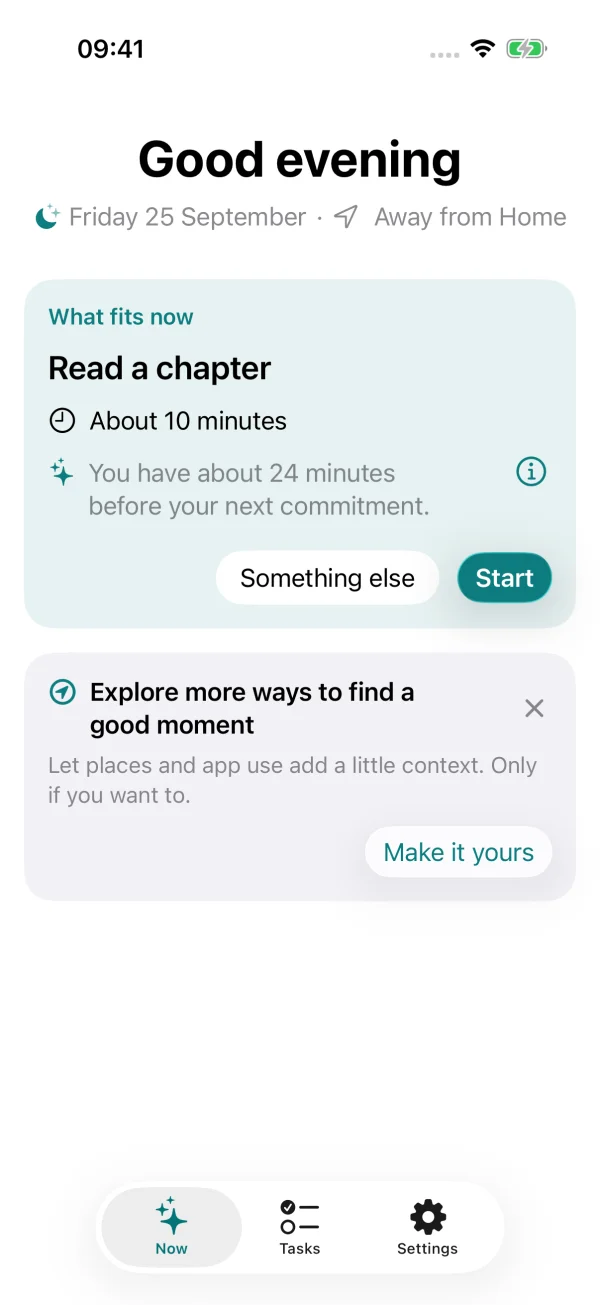
A Good Time’s Now screen suggesting Read a chapter, with its estimated time, a reason, and a Start button.
01 / One thing that fits. A reason why.
Your time, your choiceNo streaks. No guilt.Personal context stays on your device

From meaning to do, to making a little time

Good intentions. Meet a good moment.

Your list knows what you want to do. A Good Time helps with the other part: when it might fit.

The real task editor with the sample task Read a chapter, estimated completion time, place, and effort.
Add just enough detail to find a useful moment.
02 /

Give the things you care about a little space.

Add a task or an ongoing activity, how long it needs, and where it makes sense. Bring in something from Apple Reminders, or start with a fresh thought.

A small chore, a personal project, or a chapter at a time. It all belongs here.

An active focus session for Read a chapter, showing the task and controls to finish or stop.
One task, with room to pause.
03 /

A little progress is still progress.

When something fits, start a focused session. Mark a task done, record progress on an ongoing activity, or stop when you need to. Live Activities and Apple Watch keep the essentials close.

You can also ask what fits now, whenever you have a moment. No need to wait for a nudge.

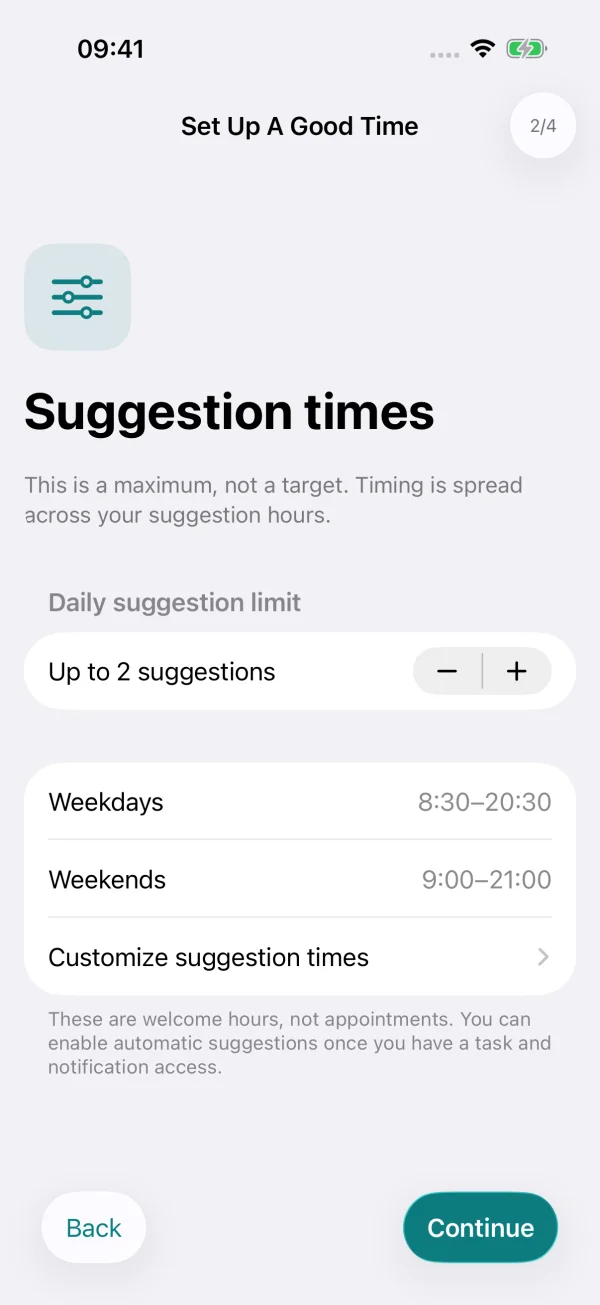
The suggestion preferences screen showing a daily maximum of two suggestions and weekday and weekend welcome hours.
You decide how much space suggestions get.
04 /

Helpful, on your terms.

Choose your welcome hours and a maximum of zero to five automatic suggestions a day. Every suggestion comes with a reason. Snooze it, choose something else, or leave it for another day.

The limit is a ceiling, never a target. Sometimes the most helpful thing is silence.

Fits into the life you already have

A little more context. A more useful suggestion.

Connect only what helps you. The app brings your tasks and your available moments together, without filling your calendar with more appointments.

Your calendar, considered

Use selected calendars to find free time around your commitments. Event titles, descriptions, attendees, and locations aren’t retained.

Your Reminders, brought along

Activate existing Apple Reminders and keep linked titles, due dates, and completion in sync. Your backlog already has a home.

The right place, too

Choose the places where a task makes sense. Optional arrival suggestions can help you notice a useful moment when you get there.

A gentler change of pace

Optional Screen Time nudges can check for a task after time in apps you choose. No blocking, limits, or judgment.

Within reach on your wrist

Use the Apple Watch companion to ask what fits, start a task, and record progress or completion. Your iPhone keeps the task list and timing logic.

Notice what you made time for

Focused sessions and a weekly reflection help you look back at your progress, without streaks or pressure to keep a score.

Personal means personal

Your day stays yours.

A Good Time processes your task and timing context on your device. No A Good Time account, analytics, or app backend.

  • Calendar access is used for busy and free intervals, not a saved copy of your events.
  • Places and Screen Time are optional. You choose which permissions to enable.
  • Exporting app data is an explicit choice, never an automatic upload.

If you connect Apple Reminders, linked reminders follow the sync settings of your chosen Apple account. This website uses no analytics or cookies; GitHub provides the hosting.

A few things to know

Can I try it yet?

Yes. Use the TestFlight link on this page to join the beta. Availability may depend on open testing places.

What do I need?

An iPhone running iOS 18 or later. The app supports English, Italian, and Spanish. Apple Watch is an optional companion.

Do I have to enable every permission?

No. Start by adding tasks and enable connections as they become useful. Calendar availability helps the app judge what fits; missing context can limit suggestions. Location and Screen Time remain optional.

Will it always nudge me at the right time?

It aims to find suitable moments, but suggestions depend on available context and iOS background delivery. A nudge isn’t guaranteed. You can always open the app, choose a task, or ask it to check what fits.

Is this a proven productivity method?

It’s an early beta exploring whether respectful timing can help with everyday tasks. There are no proven effectiveness claims. A separate, optional personal experiment lets interested testers compare timing approaches.

A Good Time · early beta

For the things you’d like to make time for.

A little less deciding when. A little more room to begin.

Join the TestFlight beta

Use TestFlight to install the beta on your iPhone.